
stopOnTerminate property
Controls whether to continue location-tracking after application is terminated.
Defaults to true. When the user terminates the app, the SDK will BackgroundGeolocation.stop tracking. Set this to false to continue tracking after application terminate.
If you do configure stopOnTerminate: false, your Flutter application will terminate at that time. However, both Android and iOS differ in their behavior after this point:
iOS
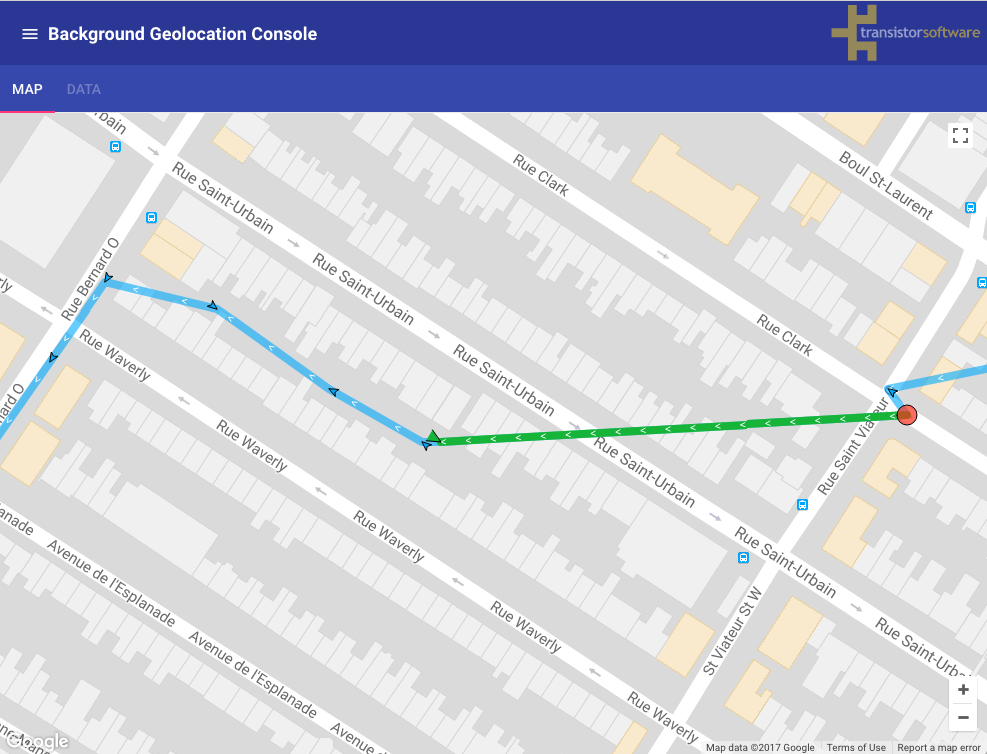
Before an iOS app terminates, the SDK will ensure that a stationary geofence of GeoConfig.stationaryRadius meters is created around the last known position. When the user moves beyond the stationary geofence (typically ~200 meters), iOS will completely reboot your application in the background, including your Flutter application and the SDK will resume tracking. iOS maintains geofence monitoring at the OS level, in spite of application terminate / device reboot.
In the following image, imagine the user terminated the application at the "red circle" on the right then continued moving: Once the device moves by about 200 meters, exiting the "stationary geofence", iOS reboots the app and tracking resumes.
Note: Demo Video of stopOnTerminate: false
Android
Unlike iOS, the Android SDK's tracking will not pause at all when user terminates the app. However, only the SDK's native background service continues to operate, "headless" (in this case, you should configure an HttpConfig.url in order for the background-service to continue uploading locations to your server).
See also:
- Android Headless Mode
- AppConfig.enableHeadless
- HTTP Guide at HttpConfig.
Implementation
final bool? stopOnTerminate;