




beamer 0.12.2  beamer: ^0.12.2 copied to clipboard
 beamer.dev
A routing package that lets you navigate through guarded page stacks and URLs using the Router and Navigator's Pages API, aka "Navigator 2.0".










Handle your application routing, synchronize it with browser URL and more. Beamer uses the power of Router and implements all the underlying logic for you.
Quick Start #
For a simple application, SimpleLocationBuilder is an appropriate choice which yields the least amount of code for a functioning application:
class MyApp extends StatelessWidget {
  @override
  Widget build(BuildContext context) {
    return MaterialApp.router(
      routeInformationParser: BeamerRouteInformationParser(),
      routerDelegate: BeamerRouterDelegate(
        locationBuilder: SimpleLocationBuilder(
          routes: {
            '/': (context) => HomeScreen(),
            '/books': (context) => BooksScreen(),
            '/books/:bookId': (context) => BookDetailsScreen()
          },
        ),
      ),
    );
  }
}
Navigating through those routes can be done with
Beamer.of(context).beamToNamed('/books/2');
And accessing route attributes (for example, bookId for building BookDetailsScreen) can be done with
Beamer.of(context).currentLocation.state.pathParameters['bookId'];
Key Concepts #
For a fairly large app, it is recommended to use Beamer in its "natural form", with custom BeamLocations
At the highest level, Beamer is a wrapper for Router and uses its own implementations for RouterDelegate and RouteInformationParser. The goal of beamer is to separate the responsibility of building a page stack for Navigator.pages into multiple classes with custom "states", instead of one global state.
For example, we would like to handle all the profile related page stacks as
[ ProfilePage ],[ ProfilePage, FriendsPage],[ ProfilePage, FriendsPage, FriendPage ],[ ProfilePage, SettingsPage ],- ...
with some ProfileHandler that knows which state corresponds to which page stack and updates this state as the page stack changes. Then similarly, we would like to have a ShopHandler for all the possible stacks of shop related pages.
These "Handlers" are called BeamLocations.
BeamLocations cannot work by themselves. When the URI comes into the app through deep-link or as initial, there must be a decision which BeamLocation will further handle this URI and build pages for the Navigator. This is the job of BeamerRouterDelegate.locationBuilder that will take the "global state" and give it to appropriate BeamLocation which will create and save its own "local state" from it to use it to build pages.
BeamLocation #
The most important construct in Beamer is a BeamLocation which represents a stack of one or more pages.
BeamLocation has 3 important roles:
- know which URIs it can handle:
pathBlueprints - know how to build a stack of pages:
pagesBuilder - keep a
statethat provides a link between the first 2
BeamLocation is an abstract class which needs to be extended. The purpose of having multiple BeamLocations is to architecturally separate unrelated "places" in an application.
For example, BooksLocation can handle all the pages related to books and ArticlesLocation everything related to articles. In the light of this scoping, BeamLocation also has a builder for wrapping an entire stack of its pages with some Provider so the similar data can be shared between similar pages.
This is an example of BeamLocation:
class BooksLocation extends BeamLocation {
  BooksLocation(BeamState state) : super(state);

  @override
  List<String> get pathBlueprints => ['/books/:bookId'];

  @override
  List<BeamPage> pagesBuilder(BuildContext context, BeamState state) => [
        BeamPage(
          key: ValueKey('home'),
          child: HomeScreen(),
        ),
        if (state.uri.pathSegments.contains('books'))
          BeamPage(
            key: ValueKey('books'),
            child: BooksScreen(),
          ),
        if (state.pathParameters.containsKey('bookId'))
          BeamPage(
            key: ValueKey('book-${state.pathParameters['bookId']}'),
            child: BookDetailsScreen(
              bookId: state.pathParameters['bookId'],
            ),
          ),
      ];
}
BeamState #
This is the above-mentioned state of BeamLocation. Its role is to keep various URI attributes such as pathBlueprintSegments (the segments of chosen pathBlueprint, as each BeamLocation supports many of those), pathParameters, queryParameters and arbitrary key-value data. Those attributes are important while building pages and for BeamState to create an uri that will be consumed by the browser.
Besides purely imperative navigation via e.g. beamToNamed('/books/3'), this also provides a method to have declarative navigation by changing the state of BeamLocation. For example:
Beamer.of(context).currentLocation.update(
  (state) => state.copyWith(
    pathBlueprintSegments: ['books', ':bookId'],
    pathParameters: {'bookId': '3'},
  ),
),
BeamState can be extended with a completely custom state which can be used for BeamLocation, for example:
class BooksLocation extends BeamLocation<MyState> {...}
It is important in this case that CustomState has an uri getter which is needed for browser's URL bar.
Beaming #
Navigating between or within BeamLocations is achieved by beaming. You can think of it as teleporting (beaming) to another place in your app. Similar to Navigator.of(context).pushReplacementNamed('/my-route'), but Beamer is not limited to a single page, nor to a push per se. BeamLocations hold an arbitrary stack of pages that get built when you beam there. Using Beamer can feel like using many of Navigator's push/pop methods at once.
Examples of beaming:
Beamer.of(context).beamTo(MyLocation());

// or with an extension on BuildContext
context.beamTo(MyLocation());
context.beamToNamed('/books/2');

// or more explicitly
context.beamTo(
  BooksLocation(
    BeamState(
      pathBlueprintSegments: ['books', ':bookId'],
      pathParameters: {'bookId': '2'},
    ),
  ),
),
context.beamToNamed(
  '/book/2',
  data: {'note': 'this is my favorite book'},
);
Updating #
Once at a BeamLocation, it is preferable to update the current location's state. For example, for going from /books to /books/3 (which are both handled by BooksLocation):
context.currentBeamLocation.update(
  (state) => state.copyWith(
    pathBlueprintSegments: ['books', ':bookId'],
    pathParameters: {'bookId': '3'},
  ),
),
NOTE that both beaming functions (beamTo and BeamToNamed) will have the same effect as update when you try to beam to a location which you're currently on, e.g. if you called context.beamToNamed('/books/3') instead of above code.
Beaming Back #
All BeamStates that were visited are kept in beamStateHistory. Therefore, there is an ability to beam back to whichever BeamLocation is responsible for previous BeamState. For example, after spending some time on /books and /books/3, say you beam to /articles. From there, you can get back to your previous location as it were when you left, i.e. /books/3.
context.beamBack();
NOTE that Beamer can integrate Android's back button to do beamBack if possible when all the pages from current BeamLocation have been popped. This is achieved by setting a back button dispatcher in MaterialApp.router.
backButtonDispatcher: BeamerBackButtonDispatcher(delegate: routerDelegate)
Usage #
To use the full-featured Beamer in your app, you must (as per official documentation) construct your *App widget with .router constructor to which (along with all your regular *App attributes) you provide
routeInformationParserthat parses an incoming URI.routerDelegatethat controls (re)building ofNavigator
Here you use the Beamer implementation of those - BeamerRouteInformationParser and BeamerRouterDelegate, to which you pass your LocationBuilder.
In the simplest form, LocationBuilder is just a function which takes the current BeamState and returns a custom BeamLocation based on the URI or other state properties.
class MyApp extends StatelessWidget {
  final routerDelegate = BeamerRouterDelegate(
    locationBuilder: (state) {
      if (state.uri.pathSegments.contains('books')) {
        return BooksLocation(state);
      }
      return HomeLocation(state);
    },
  );
  @override
  Widget build(BuildContext context) {
    return MaterialApp.router(
      routerDelegate: routerDelegate,
      routeInformationParser: BeamerRouteInformationParser(),
      backButtonDispatcher:
          BeamerBackButtonDispatcher(delegate: routerDelegate),
    );
  }
}
There are also two other options available, if you don't want to define a custom LocationBuilder function.
With a List of BeamLocations #
You can use the BeamerLocationBuilder with a list of BeamLocations. This builder will automatically select the correct location, based on the pathBlueprints of each BeamLocation. In this case, define your BeamerRouterDelegate like this:
final routerDelegate = BeamerRouterDelegate(
  locationBuilder: BeamerLocationBuilder(
    beamLocations: [
      HomeLocation(),
      BooksLocation(),
    ],
  ),
);
With a Map of Routes #
You can use the SimpleLocationBuilder with a map of routes and WidgetBuilders, as mentioned in Quick Start. This completely removes the need for custom BeamLocations, but also gives you the least amount of customizability. Still, wildcards and path parameters in your paths are supported as with all the other options.
final routerDelegate = BeamerRouterDelegate(
  locationBuilder: SimpleLocationBuilder(
    routes: {
      '/': (context) => HomeScreen(),
      '/books': (context) => BooksScreen(),
      '/books/:bookId': (context) => BookDetailsScreen(
        bookId: context.currentBeamLocation.state.pathParameters['bookId'],
      ),
    },
  ),
);
Nested Navigation #
When nested navigation is needed, you can just put Beamer anywhere in the Widget tree where this navigation will take place. There is no limit on how many Beamers an app can have. Common use case is bottom bar navigation, something like this:
class MyApp extends StatelessWidget {
  final _beamerKey = GlobalKey<BeamerState>();

  @override
  Widget build(BuildContext context) {
    return MaterialApp.router(
      routeInformationParser: BeamerRouteInformationParser(),
      routerDelegate: BeamerRouterDelegate(
        initialPath: '/books',
        locationBuilder: SimpleLocationBuilder(
          routes: {
            '/': (context) => Scaffold(
              body: Beamer(
                key: _beamerKey,
                routerDelegate: BeamerRouterDelegate(
                  locationBuilder: BeamerLocationBuilder(
                    beamLocations: _beamLocations,
                  ),
                ),
              ),
              bottomNavigationBar: BottomNavigationBarWidget(
                beamerKey: _beamerKey,
              ),
            ),
          },
        ),
      ),
    );
  }
}
General Notes #
-
When extending
BeamLocation, two methods need to be implemented:pathBlueprintsandpagesBuilder.pagesBuilderreturns a stack of pages that will be built byNavigatorwhen you beam there, andpathBlueprintsis there for Beamer to decide whichBeamLocationcorresponds to which URI.BeamLocationkeeps query and path parameters from URI in itsBeamState. The:is necessary inpathBlueprintsif you might get path parameter from browser.
-
BeamPage's child is an arbitraryWidgetthat represents your app screen / page.keyis important forNavigatorto optimize rebuilds. This should be a unique value for "page state".BeamPagecreatesMaterialPageRouteby default, but other transitions can be chosen by settingBeamPage.typeto one of availableBeamPageType.
NOTE that "Navigator 1.0" can be used alongside Beamer. You can easily push or pop pages with Navigator.of(context), but those will not be contributing to the URI. This is often needed when some info/helper page needs to be shown that doesn't influence the browser's URL. And of course, when using Beamer on mobile, this is a non-issue as there is no URL.
Examples #
Books #
Here is a recreation of books example from this article where you can learn a lot about Navigator 2.0. See Example for full application code of this example.

Advanced Books #
For a step further, we add more flows to demonstrate the power of Beamer. The full code is available here.

Deep Location #
You can instantly beam to a location in your app that has many pages stacked (deep linking) and then pop them one by one or simply beamBack to where you came from. The full code is available here. Note that beamBackOnPop parameter of beamTo might be useful here to override AppBar's pop with beamBack.

ElevatedButton(
  onPressed: () => context.beamTo(DeepLocation('/a/b/c/d')),
  // onPressed: () => context.beamTo(DeepLocation('/a/b/c/d'), beamBackOnPop: true),
  child: Text('Beam deep'),
),
Location Builder #
You can override BeamLocation.builder to provide some data to the entire location, i.e. to all the pages. The full code is available here.

// in your location implementation
@override
Widget builder(BuildContext context, Navigator navigator) {
  return MyProvider<MyObject>(
    create: (context) => MyObject(),
    child: navigator,
  );
}
Guards #
You can define global guards (for example, authentication guard) or location guards that keep a specific location safe. The full code is available here.

- Global Guards
BeamerRouterDelegate(
  guards: [
    BeamGuard(
      pathBlueprints: ['/books*'],
      check: (context, location) => AuthenticationStateProvider.of(context).isAuthenticated.value,
      beamTo: (context) => LoginLocation(),
    ),
  ],
  ...
),
- Location (local) Guards
// in your location implementation
@override
List<BeamGuard> get guards => [
  BeamGuard(
    pathBlueprints: ['/books/*'],
    check: (context, location) => location.pathParameters['bookId'] != '2',
    showPage: forbiddenPage,
  ),
];
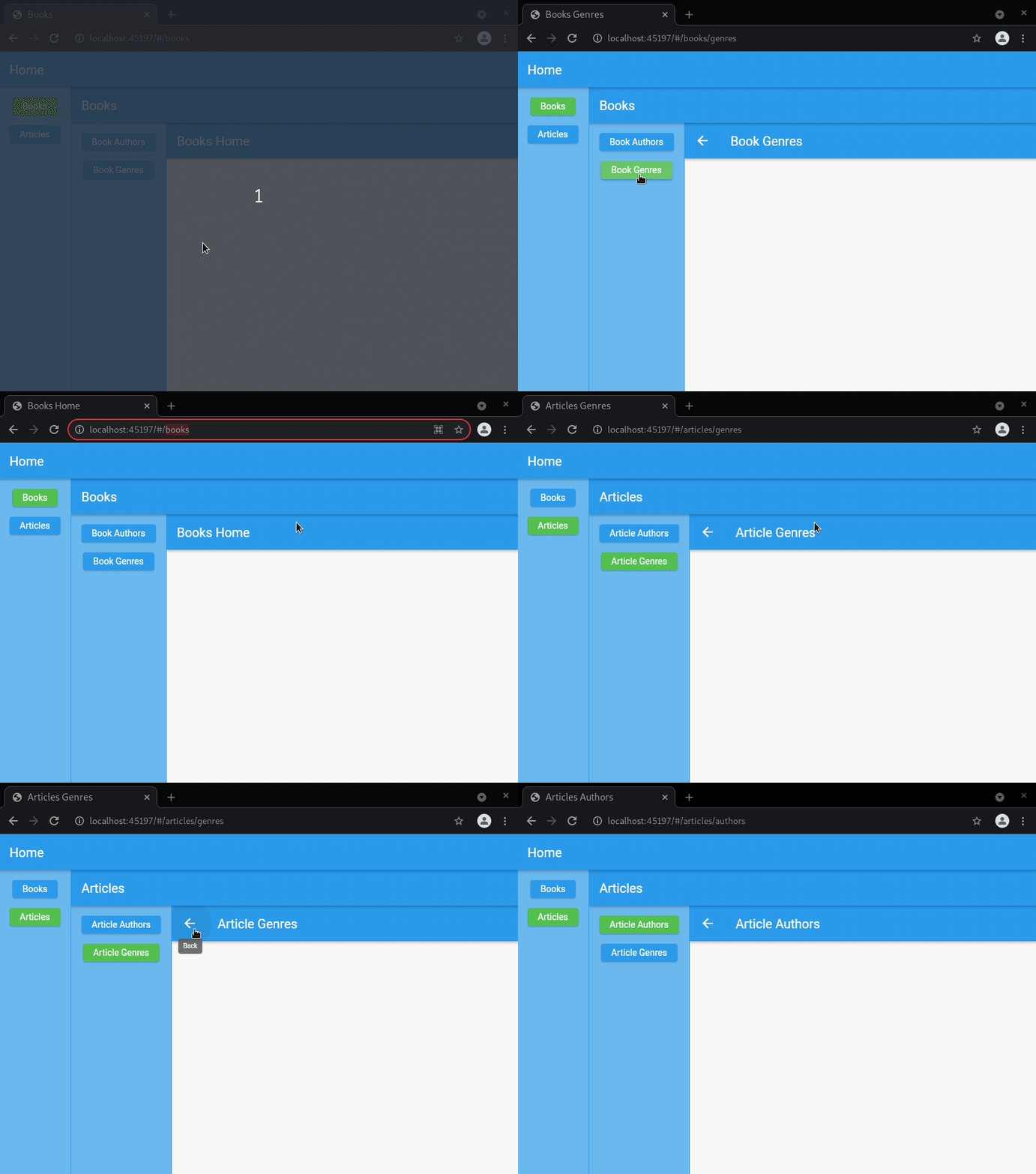
Nested Navigation #
Examples of putting Beamers into the Widget tree, when you need nested navigation.


class MyApp extends StatelessWidget {
  final _beamerKey = GlobalKey<BeamerState>();

  @override
  Widget build(BuildContext context) {
    return MaterialApp.router(
      routeInformationParser: BeamerRouteInformationParser(),
      routerDelegate: BeamerRouterDelegate(
        initialPath: '/books',
        locationBuilder: SimpleLocationBuilder(
          routes: {
            '/': (context) => Scaffold(
              body: Beamer(
                key: _beamerKey,
                routerDelegate: BeamerRouterDelegate(
                  locationBuilder: BeamerLocationBuilder(
                    beamLocations: _beamLocations,
                  ),
                ),
              ),
              bottomNavigationBar: BottomNavigationBarWidget(
                beamerKey: _beamerKey,
              ),
            ),
          },
        ),
      ),
    );
  }
}
  @override
  Widget build(BuildContext context) {
    return Scaffold(
      body: IndexedStack(
        index: _currentIndex,
        children: [
          Beamer(routerDelegate: _routerDelegates[0]),
          Container(
            color: Colors.blueAccent,
            padding: const EdgeInsets.all(32.0),
            child: Beamer(routerDelegate: _routerDelegates[1]),
          ),
        ],
      ),
      bottomNavigationBar: BottomNavigationBar(
        currentIndex: _currentIndex,
        items: [
          BottomNavigationBarItem(label: 'A', icon: Icon(Icons.article)),
          BottomNavigationBarItem(label: 'B', icon: Icon(Icons.book)),
        ],
        onTap: (index) {
          setState(() => _currentIndex = index);
          _routerDelegates[_currentIndex].updateRouteInformation();
        },
      ),
    );
  }
...

class HomeScreen extends StatelessWidget {
  final _beamerKey = GlobalKey<BeamerState>();

  @override
  Widget build(BuildContext context) {
    return Scaffold(
      appBar: AppBar(title: Text('Home')),
      body: Row(
        children: [
          Container(
            color: Colors.blue[300],
            padding: const EdgeInsets.all(16.0),
            child: Column(
              children: [
                MenuButton(
                  beamer: _beamerKey,
                  uri: '/books',
                  child: Text('Books'),
                ),
                SizedBox(height: 16.0),
                MenuButton(
                  beamer: _beamerKey,
                  uri: '/articles',
                  child: Text('Articles'),
                ),
              ],
            ),
          ),
          Container(width: 1, color: Colors.blue),
          if (context.currentBeamLocation.state.uri.path.isEmpty)
            Expanded(
              child: Container(
                child: Center(
                  child: Text('Home'),
                ),
              ),
            )
          else
            Expanded(
              child: Beamer(
                key: _beamerKey,
                routerDelegate: BeamerRouterDelegate(
                  locationBuilder: (state) {
                    if (state.uri.pathSegments.contains('articles')) {
                      return ArticlesLocation(state);
                    }
                    return BooksLocation(state);
                  },
                ),
              ),
            ),
        ],
      ),
    );
  }
}
Integration with Navigation UI Packages #
- Animated Rail Example, with animated_rail package.
- ... (Contributions are very welcome! Add your suggestion here or make a PR.)

Migrating #
From 0.11 to 0.12 #
- There's no
RootRouterDelegateanymore. Just rename it toBeamerRouterDelegate. If you were using itshomeBuilder, useSimpleLocationBuilderand thenroutes: {'/': (context) => HomeScreen()}. - Behavior of
beamBackwas changed to go to previousBeamState, notBeamLocation. If this is not what you want, usepopBeamLocation()that has the same behavior as oldbeamback.
From 0.10 to 0.11 #
BeamerRouterDelegate.beamLocationsis nowlocationBuilder. SeeBeamerLocationBuilderfor easiest migration.Beamernow takesBeamerRouterDelegate, notBeamLocationsdirectlypagesBuildernow also bringsstate
From 0.9 to 0.10 #
BeamLocationconstructor now takes onlyBeamState state. (there's no need to define special constructors and callsuperif you usebeamToNamed)- most of the attributes that were in
BeamLocationare now inBeamLocation.state. When accessing them throughBeamLocation:pathParametersis nowstate.pathParametersqueryParametersis nowstate.queryParametersdatais nowstate.datapathSegmentsis nowstate.pathBlueprintSegmentsuriis nowstate.uri
From 0.7 to 0.8 #
- rename
pagestopagesBuilderinBeamLocations - pass
beamLocationstoBeamerRouterDelegateinstead ofBeamerRouteInformationParser. See Usage
From 0.4 to 0.5 #
- instead of wrapping
MaterialAppwithBeamer, use*App.router() String BeamLocation.pathBlueprintis nowList<String> BeamLocation.pathBlueprintsBeamLocation.withParametersconstructor is removed and all parameters are handled with 1 constructor. See example if you needsuper.BeamPage.pageis now calledBeamPage.child
Help and Chat #
For any problems, questions, suggestions, fun,... join us at Discord
Contributing #
This package is still in early stages. To see the upcoming features, check the Issue board.
If you notice any bugs not present in issues, please file a new issue. If you are willing to fix or enhance things yourself, you are very welcome to make a pull request. Before making a pull request:
- if you wish to solve an existing issue, please let us know in issue comments first.
- if you have another enhancement in mind, create an issue for it first, so we can discuss your idea.
Also, you can to speed up the development.
Metadata
Publisher
Weekly Downloads
Metadata
A routing package that lets you navigate through guarded page stacks and URLs using the Router and Navigator's Pages API, aka "Navigator 2.0".
Repository (GitHub)
View/report issues
License
 unknown (license)

