
flutter_intl_phone_field 0.1.2  flutter_intl_phone_field: ^0.1.2 copied to clipboard
 mohesu.com
International phone number input for Flutter: country picker, as-you-type formatting, and libphonenumber-accurate validation for 250+ countries.
flutter_intl_phone_field #
International phone number input for Flutter: a TextFormField with a country
picker, as-you-type formatting, and libphonenumber-accurate validation for 251
countries and territories.


One widget, many looks Every field is the same IntlPhoneField
|
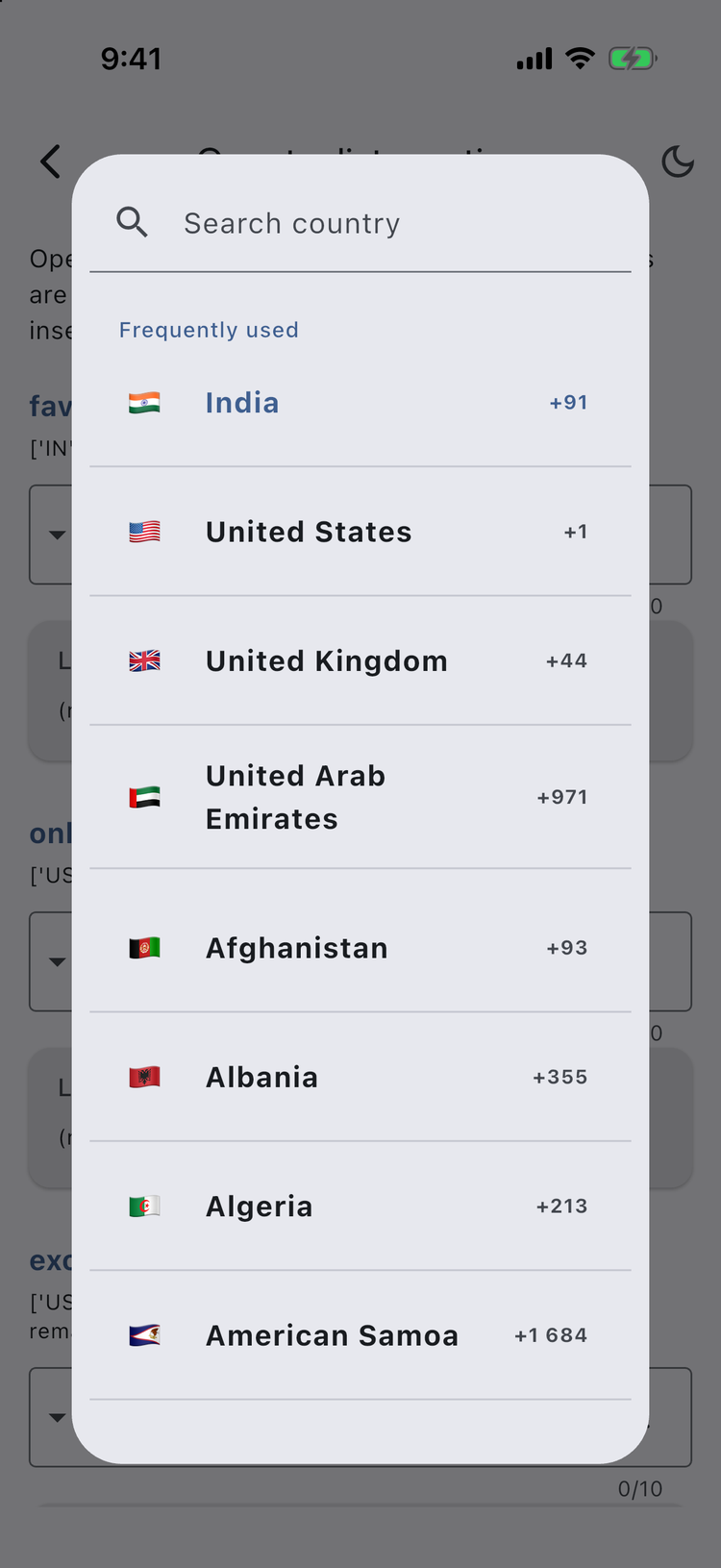
Searchable picker Favourites pinned, search by name or code |
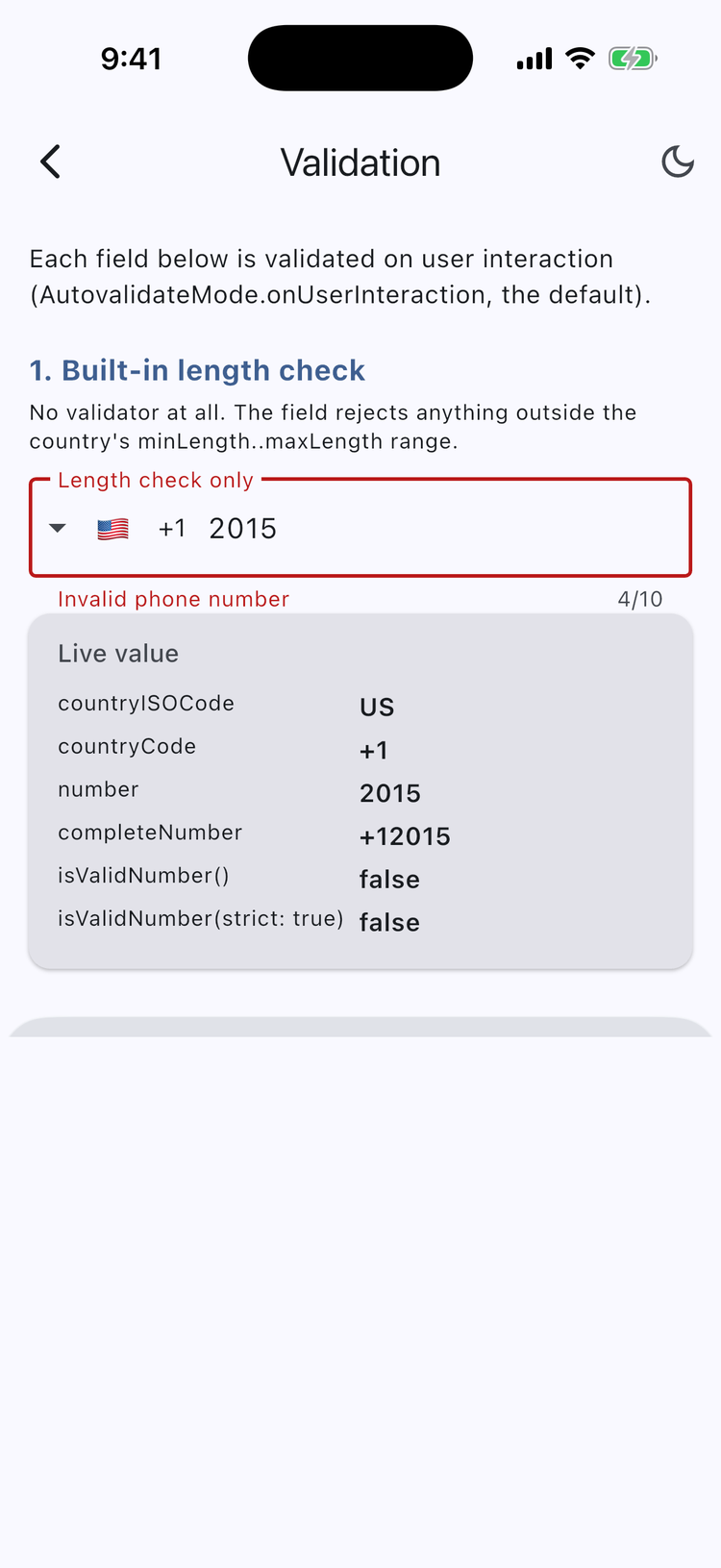
Validation built in And the exact value you get back |
Contents #
- Why this package
- Install
- Using this package with an AI coding assistant
- Quick start
- Recipes — validation, reading the value,
PhoneController, formatting, country list, picker, styling, selector, localization - Parameter reference — all 73 parameters
- Country data
- Migrating from 0.0.x
- FAQ & troubleshooting
Why this package #
| Correct by construction | Calling codes, national-number lengths, example numbers, validation patterns and formatting rules are generated from Google's libphonenumber metadata — not maintained by hand. 251 territories. |
| Knows numbers apart | Territories sharing a calling code are resolved by the leading digits of the number, so +447781123456 is Guernsey and +447400123456 is the UK. |
| Validates properly | Length checking out of the box; strictValidation additionally requires the number to fall in a real fixed-line or mobile range. |
| Formats as you type | 2015550123 renders as (201) 555-0123 using each country's own layout, while the value you receive stays digits only. |
| Flags that render everywhere | Emoji on iOS, macOS and Android; bundled PNGs on Windows, Linux and web, where flag emoji have no glyphs. |
| Fits your design | Builders for the flag, the dial code and the entire country selector. Five picker presentations. Every part hideable. |
| Fits your architecture | Immutable PhoneNumber with ==, copyWith and JSON; a PhoneController for driving the field from outside; localizable strings with no intl dependency. |
| All six platforms | iOS, Android, Web, Windows, macOS, Linux. No plugins, no platform channels, no native code. |
Install #
flutter pub add flutter_intl_phone_field
Or add it to pubspec.yaml by hand:
dependencies:
  flutter_intl_phone_field: ^0.1.1
Then import the single barrel file:
import 'package:flutter_intl_phone_field/flutter_intl_phone_field.dart';
Using this package with an AI coding assistant #
Assistants tend to write this package from memory, and their memory is of the
older, unrelated intl_phone_field package. The result compiles and is subtly
wrong — most often '+${phone.countryCode}${phone.number}', which produces
++919876543210 because countryCode already carries the +.
Option 1 — install the bundled skills (recommended) #
This package ships agent skills. One command teaches your assistant the real 0.1.0 API:
dart run skills@ get
It detects your assistant — Claude Code, Cursor, Copilot, Cline, Codex, Antigravity, opencode — and installs two skills into your project:
| Skill | What it does |
|---|---|
flutter-intl-phone-field-usage |
Correct API, common recipes, and the mistakes to avoid. Includes the full parameter reference. |
flutter-intl-phone-field-migration |
Upgrading from intl_phone_field, or from this package's 0.0.x releases. |
Option 2 — paste this prompt #
For assistants that don't support skills, paste this alongside your request:
Use flutter_intl_phone_field ^0.1.0. It is NOT the `intl_phone_field` package —
do not use that API. Import only:
  package:flutter_intl_phone_field/flutter_intl_phone_field.dart

Rules that differ from what you may remember:
- PhoneNumber.countryCode ALREADY includes the leading '+'. To get E.164 use
  phone.completeNumber. Never write '+' + phone.countryCode.
- phone.number is the national part only, never the calling code.
- isValidNumber() returns bool and never throws. validate() is the throwing one.
- PhoneNumber is immutable — use copyWith, not field assignment.
- The error-message parameter is `invalidMessage`, not `invalidNumberMessage`.
- Open the picker with showCountryPicker(...), not CountryPickerDialog(...).
- Use country.fullCountryCode to build a number, country.displayCC to show one.
  country.dialCode is the bare calling code and is not dialable on its own.
- A custom `validator` runs IN ADDITION TO the built-in length check. Pass
  disableLengthCheck: true if you want only your own rule.

Symbol index:
https://pub.flutter-io.cn/documentation/flutter_intl_phone_field/latest/index.json
Quick start #
IntlPhoneField(
  decoration: const InputDecoration(
    labelText: 'Phone number',
    border: OutlineInputBorder(),
  ),
  initialCountryCode: 'IN',
  onChanged: (phone) => print(phone.completeNumber), // +919876543210
)
The field edits the national part of the number. The calling code is shown
beside it and delivered on PhoneNumber.countryCode.
Recipes #
Validation #
The built-in check compares the digit count against the country's permitted
range and shows localizations.invalidNumber. Override just the message with
invalidMessage:
IntlPhoneField(
  invalidMessage: 'That is not a valid number',
  onChanged: (phone) => setState(() => _phone = phone),
)
A custom validator runs after the length check, so you never have to re-check
the length yourself. Return null when the number is acceptable:
IntlPhoneField(
  validator: (phone) {
    if (phone == null || phone.number.isEmpty) return 'Required';
    if (phone.countryISOCode == 'IN' && !phone.number.startsWith('9')) {
      return 'We only accept numbers starting with 9';
    }
    return null;
  },
)
Async validators are supported — the field re-runs validation when the future completes:
IntlPhoneField(
  validator: (phone) async {
    if (phone == null || !phone.isValidNumber()) return null;
    final taken = await api.phoneAlreadyRegistered(phone.completeNumber);
    return taken ? 'This number is already registered' : null;
  },
)
Strict validation additionally requires the number to match a real fixed-line or mobile range for the territory. It is off by default because it rejects numbers in ranges allocated after the bundled data was generated:
IntlPhoneField(strictValidation: true)
To turn the length check off entirely — which also lifts the typing limit — pass
disableLengthCheck: true.
Reading the value #
onChanged, onSaved and validator all hand you a PhoneNumber:
IntlPhoneField(
  onChanged: (phone) {
    print(phone.countryISOCode); // GB
    print(phone.countryCode);    // +44
    print(phone.number);         // 7400123456
    print(phone.completeNumber); // +447400123456  (E.164)
    print(phone.isValidNumber()); // true
    print(phone.toJson());
  },
)
PhoneNumber is immutable and round-trips through JSON:
final json = phone.toJson();
final restored = PhoneNumber.fromJson(json);
assert(restored == phone);
Parse a number you already have. fromCompleteNumber never throws; parse
throws NumberTooShortException or InvalidCharactersException:
final a = PhoneNumber.fromCompleteNumber(completeNumber: '+441481960194');
print(a.countryISOCode); // GG

try {
  PhoneNumber.parse('+999123');
} on NumberTooShortException catch (e) {
  print(e.message);
}
isValidNumber() returns a bool and never throws. validate() is the throwing
variant, raising NumberTooShortException, NumberTooLongException or
InvalidCharactersException so you can tell the user why the number failed.
PhoneController #
PhoneController is a ValueNotifier<PhoneNumber>, so you can read, write and
listen to the field from outside the widget:
final controller = PhoneController.fromCompleteNumber('+447400123456');
// or: PhoneController.fromParts(isoCode: 'GB', number: '7400123456');

@override
void dispose() {
  controller.dispose();
  super.dispose();
}

// ...
IntlPhoneField(phoneController: controller)

// Elsewhere:
controller.number = '7911123456';   // replace the number, keep the country
controller.country = someCountry;   // switch country, keep the number
controller.clear();                 // clear the number, keep the country
print(controller.completeNumber);
print(controller.isValid);
As-you-type formatting #
formatInput formats the field using the country's national layout. Whatever is
displayed, the value delivered on onChanged is always digits only:
IntlPhoneField(
  formatInput: true,
  initialCountryCode: 'US',
  onChanged: (phone) => print(phone.number), // 2015550123, not (201) 555-0123
)
You can also format a number yourself:
final us = countries.firstWhere((c) => c.code == 'US');
AsYouTypeFormatter.format(us, '2015550123'); // (201) 555-0123
Curating the country list #
Pin frequently used countries to the top of the picker, restrict the list, or
remove entries. favoriteCountries, onlyCountries and excludeCountries all
take ISO 3166-1 alpha-2 codes:
IntlPhoneField(
  favoriteCountries: const ['IN', 'US', 'GB'],
  excludeCountries: const ['KP'],
)

IntlPhoneField(
  onlyCountries: const ['IN', 'US', 'GB', 'AE'],
)
For full control, pass your own list — anything you can build from the exported
countries constant:
IntlPhoneField(
  countries: countries.where((c) => c.dialCode == '1').toList(),
)
Picker presentation #
dialogType chooses how the picker appears:
IntlPhoneField(dialogType: DialogType.showDialog)              // centred dialog (default)
IntlPhoneField(dialogType: DialogType.showModalBottomSheet)    // modal bottom sheet
IntlPhoneField(dialogType: DialogType.showDraggableBottomSheet) // drag between half and full screen
IntlPhoneField(dialogType: DialogType.showFullScreenPage)      // full-screen route
IntlPhoneField(dialogType: DialogType.adaptive)                // sheet on iOS/macOS, dialog elsewhere
The picker is also available on its own, and CountryPickerBody can be embedded
in a layout of your own:
final country = await showCountryPicker(
  context: context,
  countries: countries,
  selectedCountry: countries.first,
  dialogType: DialogType.showModalBottomSheet,
);
Styling the picker #
Every field of PickerDialogStyle is optional; anything left null follows the
ambient Theme:
IntlPhoneField(
  pickerDialogStyle: PickerDialogStyle(
    backgroundColor: Colors.white,
    countryNameStyle: const TextStyle(fontWeight: FontWeight.w600),
    countryCodeStyle: const TextStyle(color: Colors.black54),
    listTileDivider: const SizedBox.shrink(),
    listTilePadding: const EdgeInsets.symmetric(horizontal: 16),
    dialogPadding: const EdgeInsets.all(24),
    padding: const EdgeInsets.all(12),
    searchFieldPadding: const EdgeInsets.only(bottom: 8),
    searchFieldCursorColor: Colors.indigo,
    searchFieldStyle: const TextStyle(fontSize: 16),
    searchFieldInputDecoration: const InputDecoration(
      labelText: 'Search',
      prefixIcon: Icon(Icons.search),
    ),
    selectedTileColor: Colors.indigo.shade50,
    autofocusSearchField: true,
    showSearchClearButton: true,
    width: 420,
    heightFactor: 0.7,
    flagShape: FlagShape.circle,
    flagSize: 28,
    scrollViewKeyboardDismissBehavior: ScrollViewKeyboardDismissBehavior.onDrag,
  ),
)
Customizing the selector #
Change the flag's shape and size, or replace any part of the selector with a builder:
IntlPhoneField(
  flagShape: FlagShape.circle,   // rectangle (default), circle, rounded, square
  flagSize: 28,
)
IntlPhoneField(
  flagBuilder: (context, country) => CountryFlag(
    country: country,
    shape: FlagShape.rounded,
    size: 28,
    border: Border.all(color: Colors.black12),
  ),
  dialCodeBuilder: (context, country) => Text(
    '+${country.displayCC}',
    style: const TextStyle(fontWeight: FontWeight.bold),
  ),
)
countrySelectorBuilder replaces the whole selector. It receives a callback
that opens the picker, so your widget can still trigger it:
IntlPhoneField(
  countrySelectorBuilder: (context, country, openPicker) => TextButton.icon(
    onPressed: openPicker,
    icon: CountryFlag(country: country, size: 24),
    label: Text('+${country.displayCC}'),
  ),
)
prefixIconalso replaces the selector, but with a plain widget that cannot open the picker. UsecountrySelectorBuilderunless you deliberately want the picker to be unreachable.
Hiding parts of the selector #
Each piece of the selector can be hidden independently. showDropdownIcon: false hides the dropdown arrow — this is what
issue #18
asked for, and it has always been supported:
IntlPhoneField(
  showCountryFlag: false,  // hide the flag
  showCountryCode: false,  // hide the dial code (+44)
  showDropdownIcon: false, // hide the dropdown arrow
)
The arrow is also hidden automatically when enabled: false. To move it rather
than hide it, use dropdownIconPosition: IconPosition.trailing, and to replace
it, pass your own dropdownIcon.
Localization #
The package ships English strings and takes no localization dependency. Override the ones you need from wherever your app already resolves strings:
IntlPhoneField(
  languageCode: 'fr', // country names in the picker, from CLDR
  localizations: IntlPhoneFieldLocalizations(
    searchHint: 'Rechercher un pays',
    invalidNumber: 'Numéro de téléphone invalide',
    requiredNumber: 'Veuillez saisir un numéro',
    invalidCharacters: 'Chiffres uniquement',
    noCountriesFound: 'Aucun pays trouvé',
    countrySelectorLabel: 'Pays sélectionné : {country}. Appuyez pour changer.',
    favoritesLabel: 'Fréquemment utilisés',
  ),
)
countrySelectorLabel is the accessibility label for the selector button;
{country} is replaced with the selected country's localized name.
Example numbers as hints #
Show the selected country's real example number as the field's hint. It is
ignored when decoration already sets a hintText, and it respects
formatInput:
IntlPhoneField(
  showExampleAsHint: true,
  formatInput: true,
  decoration: const InputDecoration(
    labelText: 'Phone number',
    border: OutlineInputBorder(),
  ),
)
Parameter reference #
Every parameter of IntlPhoneField.
Value & country #
| Parameter | Type | Default | Description |
|---|---|---|---|
key |
Key? |
null |
Widget key. |
formFieldKey |
GlobalKey<FormFieldState>? |
null |
Key for the underlying TextFormField, for calling validate() or reset() directly. |
initialCountryCode |
String? |
null (falls back to US) |
The country selected initially. Accepts an ISO 3166-1 alpha-2 code ('IN') or a dial code ('+225'). |
initialValue |
String? |
null |
Pre-fills the field. Interpreted according to initialValueFormat. |
initialValueFormat |
InitialValueFormat |
InitialValueFormat.auto |
How initialValue is read: auto treats a leading +/00 as international, national never strips a country code, international always does. |
languageCode |
String |
'en' |
Language used for country names in the picker. |
countries |
List<Country>? |
null (all 251) |
The countries to offer. |
onlyCountries |
List<String>? |
null |
Restrict the picker to these ISO 3166-1 alpha-2 codes. |
excludeCountries |
List<String>? |
null |
Remove these ISO 3166-1 alpha-2 codes from the picker. |
favoriteCountries |
List<String> |
const [] |
ISO codes pinned to the top of the picker, in the order given. |
detectCountryOnPaste |
bool |
true |
Switch country automatically when a full international number is pasted or typed in. |
controller |
TextEditingController? |
null |
Controls the text being edited. One is created if you pass none. |
phoneController |
PhoneController? |
null |
Programmatic control over the country and number; listenable from outside the widget. |
Validation & messages #
| Parameter | Type | Default | Description |
|---|---|---|---|
validator |
FutureOr<String?> Function(PhoneNumber?)? |
null |
Validates the number, returning an error message or null. Runs after the built-in length check. Async validators are supported. |
disableLengthCheck |
bool |
false |
Skip the built-in minimum/maximum length check. Also lifts the typing limit. |
strictValidation |
bool |
false |
Require the number to match a real fixed-line or mobile range, not merely a plausible length. |
invalidMessage |
String? |
null |
Message shown when the length is outside the country's range. Overrides localizations.invalidNumber. |
localizations |
IntlPhoneFieldLocalizations |
IntlPhoneFieldLocalizations.fallback |
Strings shown by the field and the picker. |
autovalidateMode |
AutovalidateMode? |
AutovalidateMode.onUserInteraction |
When the field auto-validates. |
maxLength |
int? |
null (country's maximum) |
Maximum number of digits. |
maxLengthEnforcement |
MaxLengthEnforcement? |
null |
How maxLength is enforced. |
Appearance #
| Parameter | Type | Default | Description |
|---|---|---|---|
decoration |
InputDecoration |
const InputDecoration() |
Decoration for the text field. |
style |
TextStyle? |
null |
Style of the text being edited. |
showExampleAsHint |
bool |
false |
Show the country's example number as the hint. Ignored when decoration sets a hintText. |
formatInput |
bool |
false |
Format the number as it is typed, using the country's national layout. |
cursorColor |
Color? |
null |
Colour of the cursor. |
cursorHeight |
double? |
null |
Height of the cursor. |
cursorRadius |
Radius? |
Radius.zero |
Corner radius of the cursor. |
cursorWidth |
double |
2.0 |
Thickness of the cursor. |
showCursor |
bool? |
true |
Whether to show the cursor. |
magnifierConfiguration |
TextMagnifierConfiguration? |
null |
Magnifier configuration for text selection. |
Country selector #
| Parameter | Type | Default | Description |
|---|---|---|---|
showCountryFlag |
bool |
true |
Whether to show the country flag. |
showCountryCode |
bool |
true |
Whether to show the country dial code. |
showDropdownIcon |
bool |
true |
Whether to show the dropdown arrow. Ignored when enabled is false. |
dropdownIcon |
Icon |
Icon(Icons.arrow_drop_down) |
The dropdown arrow itself. |
dropdownIconPosition |
IconPosition |
IconPosition.leading |
Where the arrow sits relative to the flag and dial code. |
dropdownTextStyle |
TextStyle? |
null |
Text style for the country dial code. |
dropdownDecoration |
BoxDecoration |
const BoxDecoration() |
Decoration behind the country selector button. |
flagShape |
FlagShape |
FlagShape.rectangle |
Shape of the flag: rectangle, circle, rounded or square. |
flagSize |
double |
32 |
Width of the flag in logical pixels. |
flagBuilder |
Widget Function(BuildContext, Country)? |
null |
Replaces the flag widget entirely. |
dialCodeBuilder |
Widget Function(BuildContext, Country)? |
null |
Replaces the dial code widget. |
countrySelectorBuilder |
Widget Function(BuildContext, Country, VoidCallback openPicker)? |
null |
Replaces the whole selector; receives a callback that opens the picker. |
prefixIcon |
Widget? |
null |
Replaces the selector with your own prefix icon. The picker becomes unreachable. |
flagsButtonPadding |
EdgeInsetsGeometry |
EdgeInsets.zero |
Padding inside the selector button. |
flagsButtonMargin |
EdgeInsets |
EdgeInsets.zero |
Margin around the selector button. |
Picker #
| Parameter | Type | Default | Description |
|---|---|---|---|
dialogType |
DialogType |
DialogType.showDialog |
How the picker is presented: showDialog, showModalBottomSheet, showDraggableBottomSheet, showFullScreenPage or adaptive. |
pickerDialogStyle |
PickerDialogStyle? |
null |
Styling for the country picker. |
searchText |
String |
'Search country' |
Deprecated — use localizations.searchHint or PickerDialogStyle.searchFieldInputDecoration. Removed in 1.0.0. |
Text field #
| Parameter | Type | Default | Description |
|---|---|---|---|
keyboardType |
TextInputType |
TextInputType.phone |
Keyboard type for the field. |
keyboardAppearance |
Brightness? |
null |
Keyboard brightness. Honoured on iOS only. |
textInputAction |
TextInputAction? |
null |
Keyboard action button. |
textAlign |
TextAlign |
TextAlign.left |
How the text is aligned horizontally. |
textAlignVertical |
TextAlignVertical? |
null |
How the text is aligned vertically. |
obscureText |
bool |
false |
Whether to hide the text being edited. |
readOnly |
bool |
false |
Whether the field is read-only. |
enabled |
bool |
true |
Whether the field accepts input. When false the picker is disabled too. |
autofocus |
bool |
false |
Whether the field takes focus on first build. |
focusNode |
FocusNode? |
null |
Focus for the text field. |
inputFormatters |
List<TextInputFormatter>? |
null |
Defaults to digits-only plus the country's length limit, and as-you-type formatting when formatInput is true. Supplying your own replaces all of that. |
autofillHints |
Iterable<String>? |
null |
Defaults to [telephoneNumber, telephoneNumberNational], the order iOS expects. |
minLines |
int? |
null |
Minimum number of lines. |
maxLines |
int? |
null |
Maximum number of lines. |
expands |
bool |
false |
Whether the field expands to fill its parent. |
buildCounter |
InputCounterWidgetBuilder? |
null |
Builds the character counter. |
restorationId |
String? |
null |
Restore state across app restarts. |
Callbacks #
| Parameter | Type | Default | Description |
|---|---|---|---|
onChanged |
ValueChanged<PhoneNumber>? |
null |
Called whenever the number or the country changes. |
onCountryChanged |
ValueChanged<Country>? |
null |
Called when the user picks a different country. |
onSubmitted |
void Function(String)? |
null |
Called when the user submits from the keyboard. |
onSaved |
FormFieldSetter<PhoneNumber>? |
null |
Called when the enclosing Form is saved. |
onTap |
VoidCallback? |
null |
Called when the field is tapped. |
onTapOutside |
void Function(PointerDownEvent)? |
null |
Called when a pointer goes down outside the field — useful for dismissing the iOS numeric keyboard. |
onEditingComplete |
void Function()? |
null |
Called when editing completes. |
Country data #
Calling codes, national-number length ranges, area codes, example numbers,
national prefixes, validation patterns and formatting rules are all derived from
Google's libphonenumber metadata
(PhoneNumberMetadata.xml, Apache-2.0). Localized country names come from the
Unicode CLDR. 251 countries and territories are
covered.
The data lives in four generated files, each marked GENERATED FILE -- DO NOT EDIT BY HAND:
| File | Contents |
|---|---|
lib/src/countries.dart |
The countries constant: names, translations, calling codes, lengths, examples |
lib/src/country_patterns.dart |
Per-territory regexes used by strictValidation |
lib/src/number_formats.dart |
Per-territory national formatting rules used by formatInput |
test/libphonenumber_examples.dart |
Every published example number and the ISO code the resolver must return |
To refresh them, run the generator — it fetches the upstream metadata, rewrites
all four files, and caches its downloads under tool/.cache:
python3 tool/generate_country_data.py            # fetch sources and write
python3 tool/generate_country_data.py --offline  # reuse the cached sources
Then run the tests, which check the dataset invariants and resolve all 489 example numbers libphonenumber publishes:
dart format .
flutter analyze
flutter test
Do not hand-edit the generated files; a fix belongs upstream in libphonenumber, or in the generator.
Migrating from 0.0.x #
0.1.0 corrects the country dataset and reshapes several APIs. Country.dialCode
is now the true calling code (territories that used to carry an area code inside
it, such as American Samoa's "1684", now have dialCode: "1" and
regionCode: "684"), 117 countries had their length ranges corrected, and
isValidNumber() no longer throws.
See MIGRATION.md for the full list of changes and what to do about each one.
FAQ & troubleshooting #
Flags show as two letters (or empty boxes) on Windows or Linux.
That is the platform, not the package: Windows and most Linux font stacks have
no glyphs for regional-indicator emoji. CountryFlag already detects this and
draws the bundled PNG on Windows, Linux and the web instead. If you want the
same PNG look on every platform, build the flag yourself with
forceImage: true:
IntlPhoneField(
  flagBuilder: (context, country) =>
      CountryFlag(country: country, size: 32, forceImage: true),
)
A number I know is valid is being rejected. Three things to check, in order:
strictValidationis on. Strict mode matches the number against libphonenumber's assigned fixed-line and mobile ranges, and will reject a number in a range allocated after the bundled data was generated. Turn it off to fall back to a length check.- You are typing the national number including an area code that the package
already supplies. For territories with a fixed area code —
+1 684American Samoa,+1 345Cayman Islands — the user types only the part after it. - The trunk prefix. Domestic formats often include a leading
0that is not part of the international number;Country.nationalPrefixrecords it, and it is stripped when a number is pasted in national format.
If none of those explain it, the length range may genuinely be wrong — open an issue with the number's country and the range libphonenumber publishes.
How do I get E.164?
PhoneNumber.completeNumber:
IntlPhoneField(
  onChanged: (phone) => print(phone.completeNumber), // +447400123456
)
It is the +, the calling code, any fixed area code, and the digits typed —
with no spaces or punctuation, whatever formatInput is displaying.
Can I use the old import paths?
package:flutter_intl_phone_field/countries.dart, phone_number.dart,
country_picker_dialog.dart and helpers.dart still work as deprecated
re-export shims. Move to the single barrel file:
import 'package:flutter_intl_phone_field/flutter_intl_phone_field.dart';
Contributing #
Pull requests are welcome. For anything substantial, open an issue first so we can agree on the shape of the change.
Before submitting:
dart format .
flutter analyze   # must report "No issues found"
flutter test
Please add tests for behaviour you change, and do not edit the generated data files by hand.
License #
MIT — see LICENSE.
Metadata


Documentation
Publisher
Weekly Downloads
Metadata
International phone number input for Flutter: country picker, as-you-type formatting, and libphonenumber-accurate validation for 250+ countries.
Repository (GitHub)
View/report issues
Topics
#phone #phone-number #form #input #validation
Funding
Consider supporting this project:
github.com
License
 MIT (license)