
welloo_sdk 0.0.48  welloo_sdk: ^0.0.48 copied to clipboard
Package de transaction Welloo

Welloo SDK
*Welloo SDK* est un SDK Flutter qui facilite l'intégration du service de paiement *Welloo* dans vos applications mobiles. Il fournit des widgets, configurer et exécuter des paiements de manière sécurisée.
✨ Fonctionnalités #
- 💳 Initialisation sécurisée du SDK
- 🔗 Gestion sécurisée des transactions (dépôt, transfert)
- 📦 Intégration rapide dans n'importe quelle app Flutter
- 🧩 Compatible Android & iOS
- 🔗 Deep link automatique avec détection de statut (wellooapp://payment/success|error)
- ✅ Vérification unique de transaction (pas de polling)
- 📱 Feedback automatique via bottomsheet de succès/échec
- 🎨 Interface moderne avec animations et design responsive
- 🔄 Gestion du cycle de vie avec WidgetsBindingObserver
🔗 Les Etapes #
L'utilisation du package est la plus simple possible, dans son utilisation, il s'agit d'invoquer celui-ci avec :
- Les paramétres d'initialisation du guichet
- Le callback d'attente du retour de paiement
- Le callback d'écoute d'erreur d'exécution
Initialisation du Package #
Pour fonctionner, le sdk doit impérativement recevoir des données telles que :
- accessToken | L'access Token | Chaine de caractère | Obligatoire
- refreshToken | Le refresh Token | Chaine de caractère | Obligatoire
👩💻 Utilisation du Package #
1. Initialisation (OBLIGATOIRE) #
Le SDK doit être initialisé dans main() avant le lancement de l'app :
import 'package:flutter/material.dart';
import 'package:welloo_sdk/welloo_sdk.dart';

void main() async {
  WidgetsFlutterBinding.ensureInitialized();

  // Initialize Welloo SDK
  await WellooSdk.init();

  runApp(const MyApp());
}
2. Lancer un dépôt #
En resumé, le package s'utilise par le biais d'un appel de widget :
/* Pour Effectuer un dépôt */
Navigator.of(context).push(
  MaterialPageRoute(
    builder: (_) => WellooDeposit(
      accessToken: "ACCESS_TOKEN",
      refreshToken: "REFRESH_TOKEN",
      waitResponse: (response) {
        print(response);
        // response contient:
        // - status: "pending" | "success" | "failure"
        // - reference_transaction: "TXN_DEP_..."
        // - description: "..."
      },
      onError: (error) {
        print(error);
      }
    ),
  ),
);
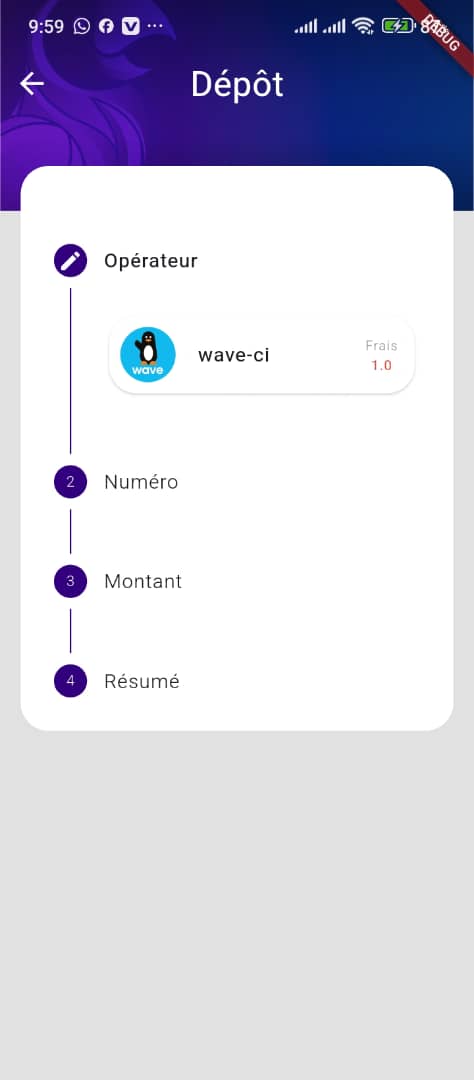
📱 Aperçu #
| Dépôt |
|---|
 |
🛠 Installation #
Exécutez cette commande :
Avec Flutter :
flutter pub add welloo_sdk
ou
Ajoutez le package à votre fichier pubspec.yaml :
dependencies:
  welloo_sdk: ^0.0.48
⚩️ Configuration Deep Links (Recommandé) #
Pour que l'app se rouvre automatiquement après le paiement Wave avec détection du statut, configurez les deep links :
Android - android/app/src/main/AndroidManifest.xml #
<activity android:name=".MainActivity" android:launchMode="singleTop">
    <!-- Vos intent-filters existants -->

    <!-- Deep link avec scheme personnalisé Welloo (RECOMMANDÉ) -->
    <intent-filter>
        <action android:name="android.intent.action.VIEW"/>
        <category android:name="android.intent.category.DEFAULT"/>
        <category android:name="android.intent.category.BROWSABLE"/>
        <data android:scheme="ci.wellooapp" android:host="payment"/>
    </intent-filter>

    <!-- Deep link legacy https (support ancien format) -->
    <intent-filter android:autoVerify="true">
        <action android:name="android.intent.action.VIEW"/>
        <category android:name="android.intent.category.DEFAULT"/>
        <category android:name="android.intent.category.BROWSABLE"/>
        <data android:scheme="https"
              android:host="api-dev.finapay.net"
              android:pathPrefix="/operations/v1/payment"/>
    </intent-filter>
</activity>
Important : L'attribut android:launchMode="singleTop" est obligatoire pour recevoir les deep links correctement.
iOS - ios/Runner/Info.plist #
<key>CFBundleURLTypes</key>
<array>
    <!-- Welloo SDK custom scheme (RECOMMANDÉ) -->
    <dict>
        <key>CFBundleTypeRole</key>
        <string>Editor</string>
        <key>CFBundleURLSchemes</key>
        <array>
            <string>ci.wellooapp</string>
        </array>
        <key>CFBundleURLName</key>
        <string>net.finapay.welloo</string>
    </dict>
    <!-- Legacy https support -->
    <dict>
        <key>CFBundleTypeRole</key>
        <string>Editor</string>
        <key>CFBundleURLSchemes</key>
        <array>
            <string>https</string>
        </array>
        <key>CFBundleURLName</key>
        <string>net.finapay</string>
    </dict>
</array>
<key>FlutterDeepLinkingEnabled</key>
<true/>
Formats de deep link supportés #
Nouveau format (recommandé) :
wellooapp://payment/success?reference=OP_DEP_...- Transaction réussiewellooapp://payment/error?reference=OP_DEP_...- Transaction échouée
Legacy :
https://api-dev.finapay.net/OP_DEP_...https://api-dev.finapay.net/TXN_DEP_...
Note : Le SDK détecte automatiquement le statut (success/error) et vérifie la transaction une seule fois avec la référence
TXN_DEP_stockée.
📚 Documentation Complète #
- 📖 Guide d'intégration détaillé
- 🔗 Configuration Deep Links avancée
- 💻 Exemple complet d'utilisation
Développé avec ❤️ par l'équipe Finapay
Metadata
Publisher
unverified uploader
Weekly Downloads
Metadata
Package de transaction Welloo
Homepage
Repository (GitHub)
View/report issues
License
 unknown (license)
Dependencies
app_links, bloc, connectivity_plus, crypto, dartz, equatable, flutter, flutter_bloc, flutter_contacts, flutter_local_notifications, flutter_secure_storage, get_it, http, permission_handler, shared_preferences, socket_io_client, url_launcher, uuid

